
AI-Powered Candidate Assessment Platform - MCQ, Coding & Proctored Tests
AI Candidate Assessment Software: Automated MCQ, Coding Tests & Proctoring
Automate candidate assessments with AI-generated MCQs, custom questions, and integrated coding challenges — all with built-in real-time proctoring. Reduce evaluation time by 80% and assess 1,000+ candidates simultaneously without manual effort.
→ STEP 1
How HR Sets Up an AI Assessment in InterviewGod
0:00 / 0:00
1. Automated Hiring Group from Job Description
 Paste the Job Description
- AI Extracts Key Skills
- Skill-Based Mapping
- Automatic Assessment Structure Creation
0:00 / 0:00
2. Review & Edit Skills
- Edit Hiring Group Name
- Add New Skills
- Remove Irrelevant Skills
- Proceed with Custom Setup
0:00 / 0:00
3. Choose AI Assessment
- Select AI Assessment as the hiring round
- The platform automatically creates AI-generated MCQ questions tailored to each skill
0:00 / 0:00
4. Section-Based Question Generation
- Select individual skills to create dedicated assessment sections
- Choose the number of questions per section (flexible quantity)
- Set difficulty levels (Easy, Medium, Hard) for each section
- Access AI-generated MCQ questions (Sample)
0:00 / 0:00
5. Add Custom Questions
- Create custom with multiple answers options (2-6 choices)
- Select one or more correct answers for partial-credit scoring
- Include explanations for correct answers (optional)
- Mix custom MCQs with AI-generated questions seamlessly
0:00 / 0:00
6. Bulk Candidate Management
- Drag-and-drop Excel files with candidate lists
- The "Send Assessment" button activates upon selection
- Integration support with existing Applicant Tracking Systems (ATS) for seamless data sync
0:00 / 0:00
7. Link Generation & Real-Time Tracking Dashboard
- Generate unique AI assessment links for each candidate
- Track invitation delivery and open rates in real time
- Monitor assessment start times and progress
- Updates candidate status as assessments are completed
- Provides filtering for scores, completion status, or approaching deadline
0:00 / 0:00
8. Proctoring Settings
Enable/disable full-screen enforcementSet multiple face detection alertsAdjust looking away thresholdsActivate lip-sync verificationEnable KYC verification requirementsEnable ChatGPT AssistanceConfigure AI-plagiarism detectionControl copy-paste trackingConfigure tab proctoring sensitivityEnable AI-response detectionLearn how companies in Manufacturing, Healthcare, Financial Services use AI Interviews for high-volume hiring with custom configurations.

→ STEP 2
Candidate Onboarding — Seamless Entry with Built-In Verification
0:00 / 0:00
When candidates receive their AI assessment link, they complete a verification process:
- Personal details entry: Basic information collection
- Optional KYC verification: Identity confirmation using document upload and facial recognition
- System readiness check: Automatic browser, camera, and microphone compatibility testing
- Instructions display: Clear guidelines on interview format, duration, and expectations
→ STEP 3
AI-Generated MCQ Assessment — Automated Knowledge Testing with Real-Time Proctoring
0:00 / 0:00
- Presents questions verified section by section based on your configuration
- Displays one question at a time or allow navigation between questions
- Tracks time spent on each question for behavioral analysis
- Auto-saves responses to prevent data loss during interruptions
- Provides Section progress indicators for candidate awareness
- Enforces time limits per section or for the entire assessment
Question types:
AI-generated MCQs
Custom MCQs
Conceptual questions
Scenario-based questions
Retail & E-Commerce and Logistics companies use multi-language AI interviews to hire frontline staff at scale.

→ STEP 4
AI-Powered Cheating Detection Throughout Assessments
0:00 / 0:00
- Full-screen enforcement: Prevents candidates from accessing external resources
- Tab switching detection: Logs when candidates switch/blocks the interview window
- Multiple face detection: Alerts when more than one person appears on camera
- Analyzes responses in real-time for originality and accuracy
0:00 / 0:00
- Looking away tracking: Records when candidates look off-screen for extended periods
- Copy-paste monitoring: Detects attempts to paste pre-written answers
- Lip-sync verification: Ensures candidate's lip movements match their spoken responses
Industries with strict compliance requirements — such as Healthcare, Pharmaceuticals, and Financial Services — rely on AI-powered interview proctoring to ensure secure, fair, and auditable hiring processes.
→ STEP 5
Session Interruption Handling — Resume AI Interviews Easily
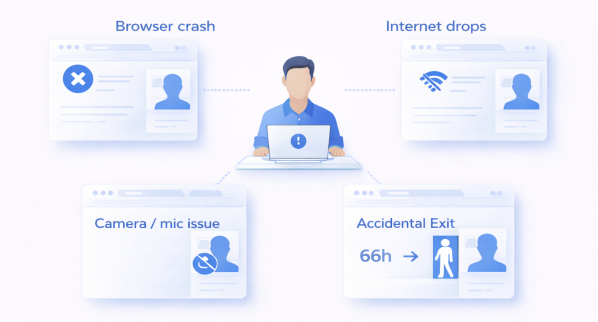
- Browser crashes: Candidates can reload and resume from their last completed question
- Internet drops: Temporary connectivity loss allow seamless re-entry
- Accidental exits: Candidates can return to AI assessment within the 66-hour deadline
- Camera/microphone issues:Hardware disconnections are logged but don't terminate the session
→ STEP 6
AI Reports — Instant, Detailed Candidate Evaluation
0:00 / 0:00
- Overall score: Percentage-based evaluation (0-100%)
- Section-wise analysis: Performance breakdown for each interview section
- Skill-wise breakdown: Detailed performance analysis for each extracted skill
- Question-level insights: Individual question scoring with AI rationale
Ready to get started?
Talk to us todayEmail us
hello@interviewgod.aiNextCoWorks, JP Nagar,
Bengaluru, Karnataka 560078
Stay up to date
Stay informed about latest updates
@2026 InterviewGod. All Rights Reserved.